
Structural Analysis and Design (STAAD) is also some time referred as STAAD Pro. For Professional.
As the name suggests it is a design computer program that deals with the designing of structure beams steel or concrete or any other material. Generally STAAD and ETABS runs parallel with each other in design; it is used to do framing of the architectural drawing that is obtained from the architect, to determine the loading combinations; then the position of beams columns is decided after which their dimensions and steel requirement is calculated and checked by STAAD.
STAAD works both ways if you give dimensions and steel percentages, it will analyze your structure and at the end even give you recommendations for the improvement in design.

STAAD.Pro
STAAD was developed by Research Engineers International in 2005 which was bought by Bentley Systems. From construction market point of view STAAD pro is one of the most widely used software for the analysis and design of structures.
It is used for both static and dynamic analysis as well considering the earthquake shaking etc. STAAD is well integrated with other softwares as well; like RAM connection and STAAD foundation design software.
What is the Use of STAAD.Pro in civil engineering
STAAD.Pro allows structural engineers to analyze and design virtually any type of structure through its flexible modeling environment, advanced features and fluent data collaboration.
Technically speaking STAAD principally uses the finite element modeling techniques. AUTOCAD is utilized for preparing plans, sections and detail drawings for design, manufacturing and construction. Besides civil works, it is used for preparing drawings in many fields including architecture, mechanical and electrical components.
Some Features of STAAD.Pro
• “Concurrent Engineering” based user environment for model development, analysis, design, visualization and verification.
- Object-oriented intuitive 2D/3D graphic model generation.
- Pull down menus, floating toolbars, tool tip help.
- Flexible Zoom and multiple views.
- Isometric and perspective views 3D shapes.
- Built-in Command File Editor.
- Simple Command Language.
- Graphics/Text input generation.
- State-of-the-art Graphical Pre and Post Processor.
- Rectangular/Cylindrical Coordinate Systems.
- Joint, Member/Element, Mesh Generation with flexible user-controlled numbering.
- Efficient algorithm minimizes disk space requirements.
- FPS, Metric or SI units.
- Presentation quality printer plots of Geometry and Results as part of run output.
- Compatible with Win95/98/NT
- On-line manual and context sensitive help
System Requirements
Before you start STAAD Pro V8i free download, make sure your PC meets minimum system requirements.
- Memory (RAM): 512MB of RAM required.
- Operating System: Windows XP/Vista/7/8
- Processor: 2GHz Intel processor or higher.
- Hard Disk Space: 500MB of free space required.
How to Install?
The following sections outline the installation procedure for both 32-bit and 64-bit Windows systems.
- Step 1: Navigate to the Bentley IEG License Service folder.
- Step 2: Run setup.exe with administrator privileges.
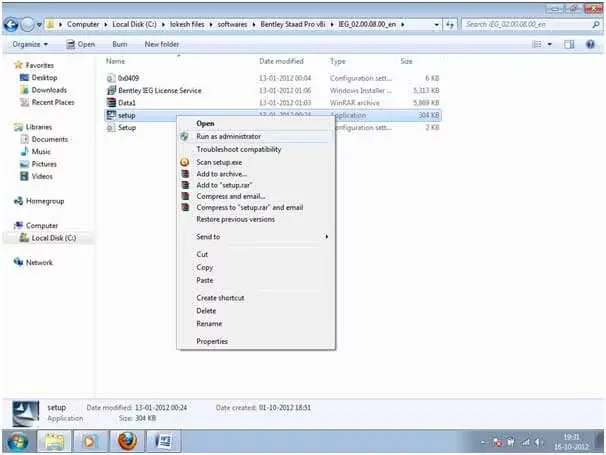
- Step 3: Install the additional setup file in the STAAD v8i Pro folder.
- Step 4: Copy the “bentley.liclib.dll” file from the Crack folder.
- Step 5: Paste the file in “C:\Program Files\Common Files\BentleyShared\IEG\IEGLCS” and confirm the replacement.
- Step 6: Double click the “Lic-Windows7” file in the ‘Crack Spro2007-V8i’ folder. Confirm the registry addition.
- Step 7: Run STAAD Pro from the desktop shortcut.
By following these steps, you’ll successfully install and activate STAAD Pro, unlocking its full potential for your structural design projects. For a deeper understanding of STAAD Pro and its applications in civil engineering, explore our post on “What Is STAAD Pro And Its Use In Civil Engineering.”
Download Link
[locked_content][locked_file name_of_file=”Bentley Staad Pro v8i.zip”]
[/locked_content]
Disclaimer:
The software name and its logo is the trademark of respective owner, we here on iamcivilengineer doesn’t host the software neither uploaded it we are just sharing here the links to download; and are just for sharing it for student and education purpose; if you have any problem about this link or software you can contact us via contact us page or email at admin@iamcivilengineer.com
Your Feedback
I hope you will like this sharing; stay tuned for the remaining updates about this topic; and don’t forget to share it to your friend and buddies on facebook, twitter and linkedin.
Thanks
Good Working..Keep it up. Full Version PC Softwares Full Version PC games
Good Working..Keep it up. Full Version PC Softwares Full Version PC games
wow… Thanks. amazing work. how to get staad foundations v8i as well
wow… Thanks. amazing work. how to get staad foundations v8i as well
Hi there i am having problems with this. I downloaded the file to my desktop and tried to install the program however i keep getting an error 1334: the file cannot be found in cabinet file \”Data1.cab\”. can anyone help me resolve this?
Hi there i am having problems with this. I downloaded the file to my desktop and tried to install the program however i keep getting an error 1334: the file cannot be found in cabinet file \”Data1.cab\”. can anyone help me resolve this?
STAAD Pro is a very good software for structural analysis and design. It gives very accurate data and world's tallest building Burj Al Arab are designed by using this awesome structural analysis software.You may need a copy of tutorial to learn this software. To have a tutorial and more free books on Civil engineering you can visit Free Books and Tutorial Download
STAAD Pro is a very good software for structural analysis and design. It gives very accurate data and world's tallest building Burj Al Arab are designed by using this awesome structural analysis software.You may need a copy of tutorial to learn this software. To have a tutorial and more free books on Civil engineering you can visit Free Books and Tutorial Download
Thank you, Canada
Thank you, Canada
Thank you :
Thank you :
Hi,can i get the staad foundation 4.0 registry file for 64 bit version,my mail id is afzal116@hotmail.com
Hi,can i get the staad foundation 4.0 registry file for 64 bit version,my mail id is afzal116@hotmail.com
Thank you very much. It's worked well … 100 % ^_^
Thank you very much. It's worked well … 100 % ^_^
HYE..why translational repeat no working for v8i?
HYE..why translational repeat no working for v8i?
same error
same error
hello….can u tell me the installation procedure please??it is asking to instal the bentely IEG file first…where is it??
hello….can u tell me the installation procedure please??it is asking to instal the bentely IEG file first…where is it??
[Lin]i have a question, does this have the Ram connection module enabled?
[Lin]i have a question, does this have the Ram connection module enabled?
i keep getting an error 1334: the file cannot be found in cabinet file \”Data1.cab\”. can anyone help me resolve this?
i keep getting an error 1334: the file cannot be found in cabinet file \”Data1.cab\”. can anyone help me resolve this?
I downloaded Stand.Pro from your site, and I opened install.txt:Install license tools, then install STAAD.Pro 2007.2Replace \”C:\\Program Files\\Common Files\\Bentley Shared\\IEG\\IEGLCS\\Bentley.liclib.dll\” with supplied one.Click Lic-Windows7.reg to update your registry.Then I executed Bentley Ieg license service and got a message it was installed and then I executed Staad Pro V8.i (window installed package) and I got “before installing this application Bentley Ieg license service need to be installed. I even executed next steps from above: Replace \”C:\\Program Files\\Common Files\\Bentley Shared\\IEG\\IEGLCS\\Bentley.liclib.dll\” with supplied one and Click Lic-Windows7.reg to update your registry but continue the problemWhat can be wrong? What should I change?
I downloaded Stand.Pro from your site, and I opened install.txt:Install license tools, then install STAAD.Pro 2007.2Replace \”C:\\Program Files\\Common Files\\Bentley Shared\\IEG\\IEGLCS\\Bentley.liclib.dll\” with supplied one.Click Lic-Windows7.reg to update your registry.Then I executed Bentley Ieg license service and got a message it was installed and then I executed Staad Pro V8.i (window installed package) and I got “before installing this application Bentley Ieg license service need to be installed. I even executed next steps from above: Replace \”C:\\Program Files\\Common Files\\Bentley Shared\\IEG\\IEGLCS\\Bentley.liclib.dll\” with supplied one and Click Lic-Windows7.reg to update your registry but continue the problemWhat can be wrong? What should I change?
This comment has been removed by the author.
This comment has been removed by the author.
Hello,,Sreenidhi P….first make sure that,, have you installed all the setup by Run as Administrator…for e.g. if you install IEG license setup. just open the folder and right click on set up file and select Run as Administrator..then you can do further installation
Hello,,Sreenidhi P….first make sure that,, have you installed all the setup by Run as Administrator…for e.g. if you install IEG license setup. just open the folder and right click on set up file and select Run as Administrator..then you can do further installation
Hello,,Sreenidhi P….first make sure that,, have you installed all the setup by Run as Administrator…for e.g. if you install IEG license setup. just open the folder and right click on set up file and select Run as Administrator..then you can do further installation
Hello,,Sreenidhi P….first make sure that,, have you installed all the setup by Run as Administrator…for e.g. if you install IEG license setup. just open the folder and right click on set up file and select Run as Administrator..then you can do further installation
thanks
thanks
This comment has been removed by the author.
This comment has been removed by the author.
Thanks well done………
Thanks well done………
how to install it?need help 😕
how to install it?need help 😕
hello, please how can I model a helical staircase on staad?
hello, please how can I model a helical staircase on staad?
It's in Bentley Staad Pro v8i/Crack Spro2007-V8i and there are clues of installInstall license tools, then install STAAD.Pro 2007.2Replace \”C:\\Program Files\\Common Files\\Bentley Shared\\IEG\\IEGLCS\\Bentley.liclib.dll\” with supplied one.Click Lic-Windows7.reg to update your registry.
It's in Bentley Staad Pro v8i/Crack Spro2007-V8i and there are clues of installInstall license tools, then install STAAD.Pro 2007.2Replace \”C:\\Program Files\\Common Files\\Bentley Shared\\IEG\\IEGLCS\\Bentley.liclib.dll\” with supplied one.Click Lic-Windows7.reg to update your registry.
Yeah you are write Pinxuan Li 🙂
Yeah you are write Pinxuan Li 🙂
Good day,I have a great will to learn Staad pro. Could someone send me the link for downloading it for 64 bit version Window 8.my e-mail is: r_eldar@mail.ruThank you very much for the help.
Good day,I have a great will to learn Staad pro. Could someone send me the link for downloading it for 64 bit version Window 8.my e-mail is: r_eldar@mail.ruThank you very much for the help.
Dear AllI have a current project that needs to be done on STAAD PRO for a client. It is to calculate the total stress loads on two firewater tanks to see if it can withstand the installation of another walkway. Please contact me if you interested and i will send you SOW and all drawings.
Dear AllI have a current project that needs to be done on STAAD PRO for a client. It is to calculate the total stress loads on two firewater tanks to see if it can withstand the installation of another walkway. Please contact me if you interested and i will send you SOW and all drawings.
We will be sharing the links with you soon .. so stay tuned 🙂
We will be sharing the links with you soon .. so stay tuned 🙂
Could someone send the link for downloading it for 64 bit version Window 8.Thank youHave a Good Day
Could someone send the link for downloading it for 64 bit version Window 8.Thank youHave a Good Day
be careful on the seismic result..
be careful on the seismic result..
hi wintergreen229@gmail.com
hi wintergreen229@gmail.com
i have downloaded the staad pro v8i and tried to load through administrator but after registry it says registered successfully. but when i run the staad from i-con, iget an error 126.may i request u to help me
i have downloaded the staad pro v8i and tried to load through administrator but after registry it says registered successfully. but when i run the staad from i-con, iget an error 126.may i request u to help me
Is that 32 bit or 64 bit????? pls tell me????
Is that 32 bit or 64 bit????? pls tell me????
Hi Iqbal, Thanks for sharing. Will it work for Mac OSX ??? Actually i am looking for cracked version of STAAD pro which supports Mac. Please let me know if you have and help me out. Thanks in advance.
Hi Iqbal, Thanks for sharing. Will it work for Mac OSX ??? Actually i am looking for cracked version of STAAD pro which supports Mac. Please let me know if you have and help me out. Thanks in advance.
Thanks…..
Thanks…..
hi.. i installed staad pro v8i..but, the dialogue box says 15 days trial period… is that mean \”expire?????\”
hi.. i installed staad pro v8i..but, the dialogue box says 15 days trial period… is that mean \”expire?????\”
hi i tried installing but it says unable to load specified module error 126
hi i tried installing but it says unable to load specified module error 126
This software only works with pre win 7 …thanks its brilliant on xp
This software only works with pre win 7 …thanks its brilliant on xp
Where can i get staad foundation advanced full or with crack???? i'm desperate :'( Please help me my mail is azertuche1251@hotmail.com
Where can i get staad foundation advanced full or with crack???? i'm desperate :'( Please help me my mail is azertuche1251@hotmail.com
thanks a ton!!
thanks a ton!!
thanks ,,,,but i have tried to work with structure wizard and it cannot open,,anyone help
thanks ,,,,but i have tried to work with structure wizard and it cannot open,,anyone help
please guide to install the crack version of staad pro
please guide to install the crack version of staad pro
please help me i installed software as order and appearantly it works correct but none of design codes works in error file software shows this message: this code dosnt support by software i installed software in one pc and it works perfect but when i want to install on another pc that issue i said appears
please help me i installed software as order and appearantly it works correct but none of design codes works in error file software shows this message: this code dosnt support by software i installed software in one pc and it works perfect but when i want to install on another pc that issue i said appears
Hey, I have the same issue. It's not working properly for smaller spacing (<10m). Did you manage to get yours fixed?
Hey, I have the same issue. It's not working properly for smaller spacing (<10m). Did you manage to get yours fixed?
Sir! Please help… Where to get Staad Foundation Advanced full version download link for free?
Sir! Please help… Where to get Staad Foundation Advanced full version download link for free?
I have encounter the same problem right now.. how did u fixed yours? My OS is win 8.1.
I have encounter the same problem right now.. how did u fixed yours? My OS is win 8.1.
I have encounter the same problem right now.. how did u fixed yours? My OS is win 8.1.
I have encounter the same problem right now.. how did u fixed yours? My OS is win 8.1.
lot of function not work properly
lot of function not work properly
I would like to thank you for the efforts you have made in writing this post and the free staad pro download links you just provided. I JUST FINISH THE INSTALLATION
I would like to thank you for the efforts you have made in writing this post and the free staad pro download links you just provided. I JUST FINISH THE INSTALLATION
My translational repeat doesn't work also. Even copy+paste doesn't. How can we fix this?
My translational repeat doesn't work also. Even copy+paste doesn't. How can we fix this?
THANKS saadi!!FOR THIS staad pro download, this is what i have been searching for on googleplease is the update not yet out from bentley
THANKS saadi!!FOR THIS staad pro download, this is what i have been searching for on googleplease is the update not yet out from bentley
Will it work for Windows 10 64 bit….????
Will it work for Windows 10 64 bit….????
Thanks so much.. keep it up
Thanks so much.. keep it up
Please can I get the link for download , dareremi225@gmail.com
Please can I get the link for download , dareremi225@gmail.com
Dear @dare remi, for sure you can get the software to download by becoming our member click this link to get our member http://www.iamcivilengineer.com/p/membership-application.html
Dear @dare remi, for sure you can get the software to download by becoming our member click this link to get our member http://www.iamcivilengineer.com/p/membership-application.html